Electric Wheelchair Controllers and Joysticks: B2B Buying Guide
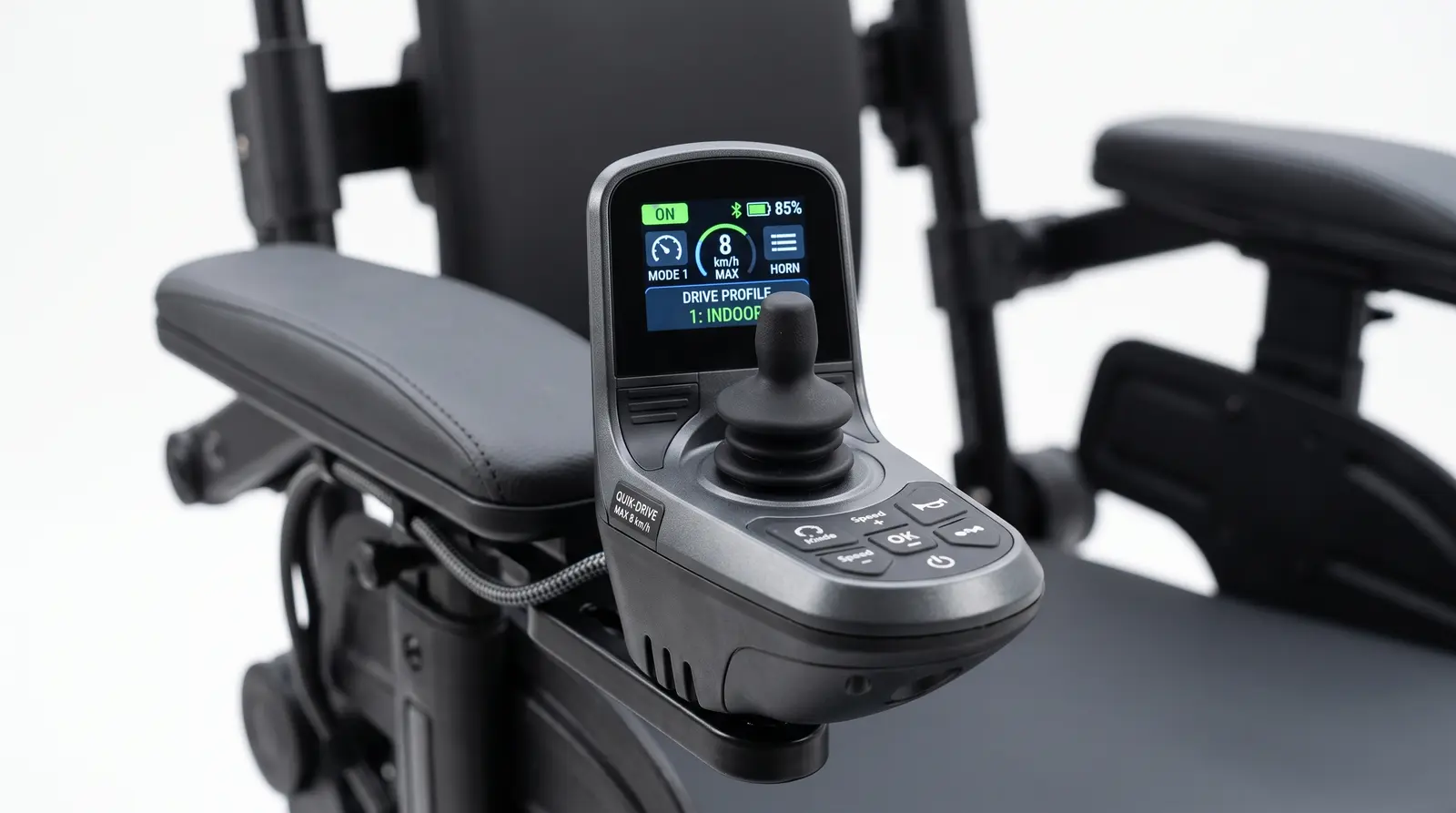
Electric Wheelchair Controllers and Joysticks: Why the Drive Interface Matters
A motor may provide the power, but the controller and joystick decide how that power reaches the user. A well-matched system gives smooth starts, predictable turns, controlled braking, and simple service. A poorly specified system can make an electric wheelchair difficult to operate even when the frame, battery, and motors look impressive on paper.
For importers and distributors, the controller should be treated as part of the product platform. It affects user experience, safety, customization, spare-parts planning, and whether the same chair can support different control needs across a market.
Proportional and Non-Proportional Joysticks
Most powered wheelchairs use one of two control styles:
- Proportional joystick: The distance and direction of joystick movement determine speed and travel direction. It offers precise control for indoor maneuvering, ramps, and crowded spaces.
- Non-proportional control: Buttons or switches provide fixed commands such as forward, reverse, left, and right. This can suit users who cannot reliably operate a conventional joystick, but it requires a compatible control interface.
A proportional joystick is not automatically better for every user. Buyers should confirm operating force, grip shape, response curve, dead zone, and whether speed and acceleration can be programmed for the intended driver.
Specifications B2B Buyers Should Request
Ask the factory for a complete controller data sheet, not only a joystick photograph. The file should identify:
|---|---|
Performance figures should be tied to the complete wheelchair configuration. Controller current, motor rating, battery capacity, tire type, user weight, and incline all influence the result.
Programming Is a Product Feature
A programmable controller lets a technician adjust the chair to the user's ability and environment. Indoor settings may prioritize low speed and gentle acceleration, while outdoor settings may require stronger hill response and controlled deceleration.
Useful parameters can include maximum forward and reverse speed, acceleration, deceleration, turning speed, joystick sensitivity, and braking behavior. Changes should be made by trained personnel and recorded in the service file. A supplier should explain which programming tool is required and whether authorized distributors can access it.
B2B tip: ask for the default settings, adjustment range, and reset procedure before placing an order. A chair that can be tuned but cannot be supported locally is not a complete solution.
Joystick Ergonomics and User Fit
The control interface must match the user's strength, reach, and hand function. Compare the grip diameter, button placement, cable exit, mounting angle, and whether the joystick can be moved to the left or right side. A swing-away mount may help with transfers and table access.
For users with limited hand control, tremor, or progressive weakness, ask whether the controller platform can accept a light-touch joystick, head array, chin control, or single-switch scanning interface. This can extend the useful life of the chair and reduce the need for a complete replacement when the user's abilities change.
Attendant Controls and Fleet Use
An attendant control gives a caregiver a way to move the chair during transport, training, or fatigue. It is particularly valuable in hospitals, rental fleets, care homes, and family settings where the user is not always the driver.
Verify where the attendant control is mounted, whether it can be removed, how control is transferred, and whether the active operator is clearly indicated. The system should prevent conflicting commands and return to a safe state after a cable is disconnected.
Safety and Fault Handling
A professional controller should detect conditions such as a stalled motor, low battery voltage, excessive current, disconnected joystick, or communication fault. Ask how the chair indicates a fault and what the first service check should be.
The joystick should return to neutral reliably, and the chair should not start moving if it is powered on while the joystick is already deflected. Confirm electromagnetic brake behavior, freewheel interlocks, and the response after a temporary power interruption. These details deserve functional testing on the approved sample.
Spare Parts and Service Planning
Controller failures can immobilize a customer, so distributors should stock the parts that are most likely to cause downtime. Request exact part numbers for the controller, joystick module, cable, charger, fuse, and any programming lead.
A useful service package includes a wiring diagram, fault-code list, replacement procedure, programming instructions, and a compatibility table for different motor and battery configurations. Avoid mixing controller revisions unless the supplier confirms interchangeability in writing.
Decision Framework for B2B Buyers
1. Match controller current and voltage to the motor and battery specification.
2. Choose the control style according to user ability and primary environment.
3. Confirm programming access for local technicians and recordable settings.
4. Check alternative and attendant controls if the market includes clinical or progressive conditions.
5. Test neutral-start, braking, fault indication, and cable connections on the sample.
6. Build a spare-parts plan with controller and joystick part numbers before launch.
FAQ
What is the difference between a joystick and a wheelchair controller?
The joystick is the user input device. The controller interprets that input and sends power commands to the motors, while also managing braking, protection, and fault responses.
Is a proportional joystick easier to use?
It often provides smoother and more precise control, especially indoors, but ease of use depends on the user's strength, coordination, programming, and seating position. Some users need alternative switch or head controls instead.
Can an electric wheelchair use an attendant control?
Many models can, provided the controller supports it. Confirm the mounting arrangement, operator-selection method, safety behavior, and replacement cable before ordering.
The B2B Bottom Line
A complete electric wheelchair quotation should specify the controller, joystick, programming capability, safety behavior, and service pathway — not just the motor wattage and battery size. Buyers who verify the drive interface on a sample can reduce training time, improve user fit, and protect their after-sales margin.
**Comparing controller options for an electric wheelchair order?** [Contact the MiniElephant export team](https://www.semwheelchair.com/contact) for drive-system specifications, alternative controls, and B2B configuration support.
Related reading
Interested in MiniElephant Electric Wheelchairs?
Get a customized quotation and product recommendation from our export team. Response within 24 hours.